
Weather & Widget - Weawow
WeawowWeather
4.958.66K Reviews
- Version
- 7.2.0
- Installs
- 10.00M
- Age Rating
- Everyone
Screenshots

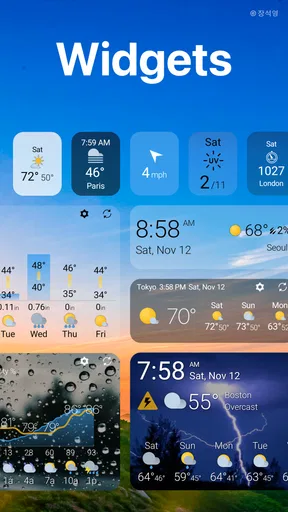
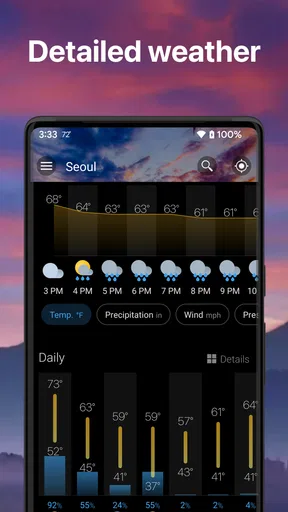
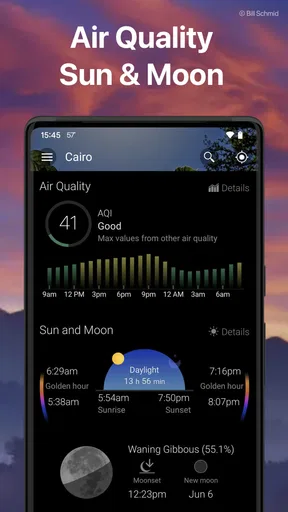
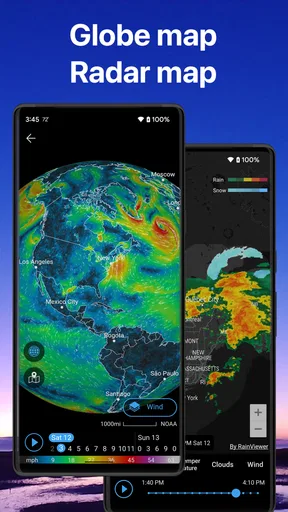
Our Review of Weather & Widget - Weawow
 Analysis by Appyee
I usually want two things from a weather app: a quick answer about what to wear and enough detail to change plans if the forecast shifts. Weather & Widget - Weawow is built for both, pairing a visual forecast with a home-screen widget you can shape around the details you actually check. It is a weather app from Weawow, and its appeal is less about novelty than about making routine forecast-checking feel clear and personal.
For a first-time user, the simplest goal is to open the app, choose a location, and answer one practical question: should I take a rain jacket before leaving? The layout gives you a place to start, while the extra forecast views and customization options are there when a quick glance is not enough. I would approach it as a useful daily tool, not as a guarantee that every forecast will match the sky outside.
What to expect from the forecast
Weawow combines weather information with a photo-led presentation, so it feels more inviting than the plain lists and blocks of numbers common in many built-in weather apps. Its average rating is 4.9, and it has more than five million installs. Those figures suggest that many people have found a reason to keep it, but the more important question for me is whether its screens help with ordinary decisions. The hourly and weekly views are useful for different reasons: one helps with timing today, while the other gives a broader sense of the days ahead.
The radar view is worth exploring when the forecast says rain is possible and you need to decide whether to leave now or wait. A map can make changing conditions easier to understand than a single percentage, though it still takes a little interpretation and should not be treated as a promise about the exact minute rain will begin at your address. I find that distinction important: the app can help you plan with more context, but local weather remains changeable.
Weawow is free to install, rated for everyone, and offers optional in-app purchases ranging from $2 to $50 per item. The app is currently at version 7.1.1, with Android support starting at version 5.0. Weawow’s description also says it collects no data, a reassuring point for people who prefer to keep their everyday utility apps simple. The central experience is available without ads, which makes opening the forecast feel calmer than using many ad-heavy alternatives.
Getting started and making it useful
When you first fire up Weather & Widget - Weawow, what strikes you immediately is its gorgeous design. Seriously, this app is like the supermodel of weather apps. The interface is sleek, clean, and beautifully organized. It’s not just easy on the eyes; it’s intuitive. You don’t need a manual to navigate through the features, which is always a win in my book.
Setting it up is a breeze. You just allow location access, and bam, it starts dishing out weather info tailored to your area. You can also add multiple locations, which comes in handy if you’re a frequent traveler or just like to keep tabs on the weather in different parts of the world.
Your first useful check
After choosing a location, I would start with a simple routine rather than changing every setting at once. Look at the current conditions, then move to the hourly forecast if you have a specific trip or errand in mind. For example, if I am walking to a lunchtime appointment, I can check whether rain is expected around that part of the day instead of relying on the morning’s conditions. If the possibility looks uncertain, I can use the radar view as another clue and make a sensible choice about carrying a compact umbrella.
That workflow is more valuable than trying to read every number on the screen. A forecast becomes useful when it answers a decision: whether to cycle, when to take a dog out, or whether to move a short outdoor task earlier. The weekly view then helps with larger plans, while I still check the hourly details before committing to a particular time. This is a small habit, but it helps prevent the common mistake of treating a week-ahead outlook as a precise schedule.
Features that Stand Out
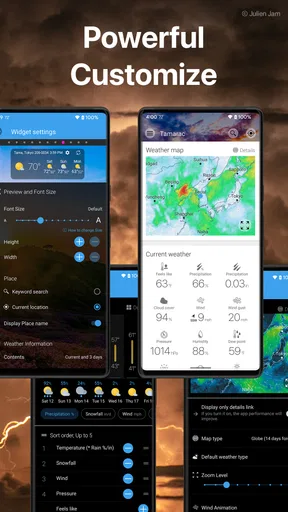
This app doesn’t just stop at telling you the temperature. Oh no, it goes all out. You get hourly forecasts, weekly forecasts, and even radar maps, which I find super helpful. The radar maps are quite detailed, providing a visual representation of weather changes. It’s like having a mini meteorologist in your pocket.
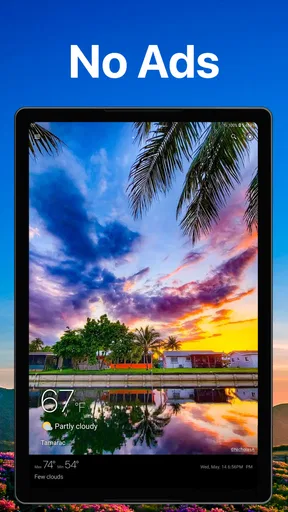
One of the standout features of Weawow is its ad-free experience. That’s right, no annoying pop-ups or banner ads to ruin your experience. It’s refreshing, to say the least, and it makes you appreciate the app even more.
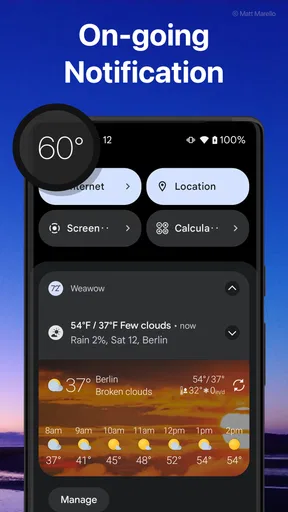
Widget customization is one of the app’s more practical strengths, but it also asks you to make choices. Rather than putting every available measurement on the home screen, I would select only the information I tend to act on, such as temperature and wind speed, then keep less frequently used details inside the app. A crowded widget can be harder to scan than opening the forecast, especially on a busy morning. The useful trick is to treat the widget as a shortcut to one quick decision, not as a miniature version of every screen.
If you check weather for more than one place, the location list can serve a simple planning role. I might keep home and a destination together before a weekend visit, then compare their outlooks without repeatedly changing the main location. That is more convenient than searching from scratch each time. It is also worth remembering that a forecast for a city does not necessarily describe conditions along an entire journey, so I would use saved places for broad planning and check the relevant local area when timing matters.
Where it fits among weather apps
Compared with a phone’s built-in weather app, Weawow is a better fit for someone who wants more control over presentation and a widget that can be tailored to personal habits. A built-in option may be preferable if you want the most stripped-down experience and do not care about adjusting the display. Compared with weather services that put maps and technical readings front and center, Weawow feels more approachable: you can begin with a visual overview and explore details when you need them.
That balance will not suit everyone. If your main requirement is a highly specialized tool for professional forecasting, outdoor operations, or safety-critical decisions, I would not rely on a general-purpose phone app alone. Likewise, if you only check the temperature once in a while, the extra views and widget settings may be more choice than you need. Weawow makes most sense for people who look at the forecast often enough to appreciate a more personal layout but still want a straightforward everyday starting point.
Usability and Performance
In terms of performance, Weawow is a smooth operator. It loads quickly and updates in real-time. I’ve had no issues with lag or crashes, which is crucial, especially when you’re checking the weather on the go.
The app also supports multiple languages, making it accessible to a broader audience. Whether you’re in Tokyo, Paris, or New York, Weawow has you covered.
Weather apps can feel confusing when several screens show related information in different formats. My advice is to give each view a job: use the current conditions for a quick snapshot, the hourly forecast for decisions later today, the weekly outlook for rough planning, and radar when the timing or movement of rain is the question. This keeps the app from becoming a stream of numbers to inspect without a purpose. It also makes it easier to tell when you already have enough information to decide.
Another practical consideration is how much you customize. The freedom to adjust a widget is helpful, but it can take a little experimenting to find a layout that stays readable on your particular home screen. I would make one change at a time and live with it for a day before adding more. That way, if a display feels cluttered, it is easier to identify which choice made it harder to use. The best setup is not the one with the most readings; it is the one you can understand at a glance.
Another nifty feature is the weather photo sharing option. Users can upload and share their own weather-related photos. It's a fun way to engage with the weather community and see real-time conditions from around the globe.
The photo element adds a human touch to an otherwise practical tool, although I see it as a pleasant extra rather than a reason to choose the app on its own. When I want a forecast, I would focus on the forecast screens; when I have time to browse, shared images can make weather feel less abstract by showing conditions as people experience them. Keeping those uses separate helps the community aspect complement the utility instead of distracting from it.
Who will get the most from it
I would recommend Weawow to someone who checks the weather before commuting, walking, or making casual outdoor plans and enjoys being able to tune a widget instead of accepting a fixed layout. It is also handy for households or travelers who want several locations close at hand. The no-ad experience is a meaningful everyday advantage: weather checks are often brief, and it is pleasant not to have an advertisement interrupt that small task.
On the other hand, I would steer a person toward a simpler alternative if they want only a basic temperature reading and no customization. I would also avoid treating any consumer forecast as the final word for a high-stakes outdoor decision. For a hike, long drive, or activity where changing conditions could create a real risk, use the app as one planning aid and consult appropriate local guidance as well. That is not a flaw unique to Weawow; it is a sensible limit for a general weather app.
Final Thoughts
So, is Weather & Widget - Weawow worth a download? In my opinion, absolutely. It’s not just about the aesthetics; this app delivers accurate, detailed weather information in an elegant package. Whether you’re a weather enthusiast or just someone who wants to know if they need a jacket today, Weawow is a fantastic choice.
With its ad-free experience, stunning design, and reliable performance, it’s no wonder users rave about it. So why not give it a whirl? Head over to your app store, download Weawow, and bask in the beautiful simplicity of knowing the weather like never before.
My practical recommendation is to begin with location setup, then use the hourly view for your next real decision instead of spending time customizing everything immediately. Once you know which details you check repeatedly, shape the widget around those and leave the rest for the full app. That makes the first session feel useful without turning setup into a project.
Overall, I see Weawow as a thoughtful middle ground: more flexible and visually engaging than a bare-bones forecast, yet approachable enough for everyday use. Its strongest case is the combination of multiple forecast views, adaptable widgets, and a quiet ad-free experience. If those are the things you value, it is an easy app to keep within reach; if you only need the simplest possible glance, your phone’s default weather screen may be all you need.
Privacy and Permissions
See what permissions an app requests and how it handles your data.
- Location
- approximate location (network-based), precise location (GPS and network-based)
- Other
- view network connections, full network access, run at startup, prevent device from sleeping, set an alarm
Verdict
Strengths of Weather & Widget - Weawow
- Highly accurate and reliable forecasts.
- Customizable widgets with beautiful designs.
- Ad-free experience for a seamless use.
- Detailed information like humidity, UV index.
- Real-time updates on severe weather alerts.
Limitations of Weather & Widget - Weawow
- Limited language support for non-English users.
- Occasional slow loading times during peak hours.
- No offline mode for areas with poor connectivity.
- Lacks integration with smart home devices.
- Some features locked behind a paywall.
Similar Picks in This Category
View All
Weather - By Xiaomi
Xiaomi Inc.4.1

Weather & Radar Forecast
WetterOnline4.8

Weather
OneLouder Apps4.6

AccuWeather: Weather Radar
AccuWeather3.6

The Weather Channel - Radar
The Weather Channel4.6

1Weather Forecasts & Radar
OneLouder Apps4.3
Frequently Asked Questions
What platforms support Weather & Widget - Weawow?
Weather & Widget - Weawow is available for both Android and iOS platforms. Users can download it from the Google Play Store for Android devices and the Apple App Store for iOS devices. Ensure your device meets the app's compatibility requirements for a seamless experience.
Does Weather & Widget - Weawow offer real-time weather updates?
Yes, Weather & Widget - Weawow provides real-time weather updates, ensuring you have the most current information at your fingertips. The app uses data from reliable sources to offer accurate weather forecasts, radar maps, and alerts for changes in weather conditions.
Are there customization options for the widgets in Weawow?
Absolutely, Weawow offers extensive customization options for its widgets. Users can adjust the widget size, choose different themes, and select the specific weather data they want displayed. This allows for a personalized experience tailored to individual preferences.
Is Weather & Widget - Weawow free to use, or are there in-app purchases?
Weather & Widget - Weawow is free to download and use. However, the app offers optional in-app purchases, such as ad-free experiences and premium features. These purchases support the developers and enhance the app's functionality, but the basic features remain accessible to all users.
How reliable is the weather data provided by Weawow?
Weawow sources its weather data from several reputable providers, ensuring high accuracy in forecasts and current conditions. The app's reliability is enhanced by its use of multiple data feeds, which helps cross-verify information and provide users with dependable weather updates.
